
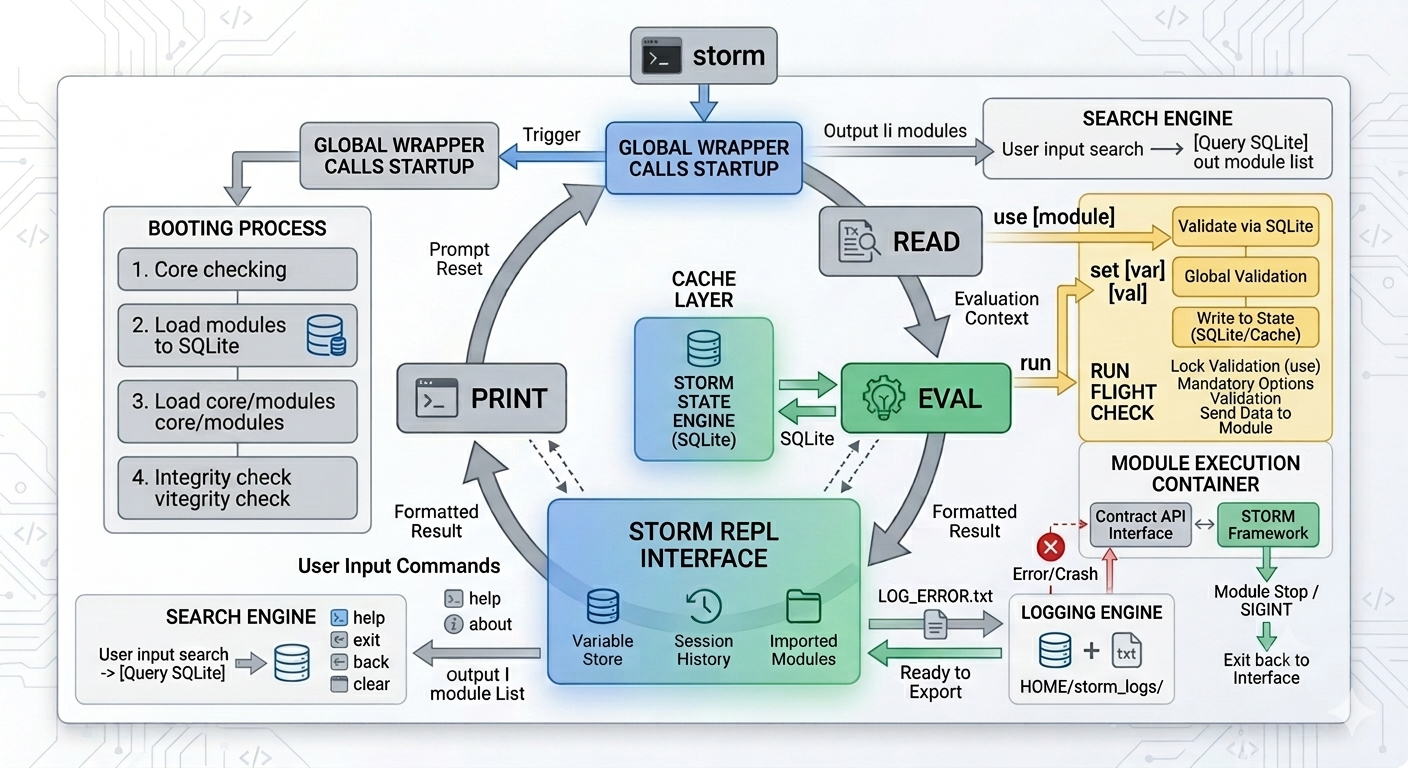
Flow & Arch
Storm is a web-based framework Stateful REPL (Read-Eval-Print Loop) designed with an isolated modular architecture. This framework uses SQLite as embedded database for state management, session tracking, and internal logging, ensuring data consistency across the execution cycle.
🏗️ FLOW & Booting Sequence
When the command storm executed, A global wrapper will trigger the script startup on root directory to start the process booting a system consisting of 4 critical stages:
- Core Verification: Ensuring the integrity of the framework's core components.
- Module Synchronization (SQLite): Melakukan scanning otomatis pada direktori modul. Jika ditemukan perubahan, data metadata modul langsung disinkronisasikan ke dalam SQLite.
- Binary Loading (SQLite): Loading all compiled binaries both from the core and modules into the SQLite.
- Integrity Check: Perform verification cryptographic checksum or internal validation to ensure no binaries are corrupted or illegally modified.
After the boot phase is successful, the user will be faced with Main Interface (minimalist UI/UX: banner, system statistics, update checker, and command prompt main).
🎮 Core REPL Commands
The Storm interface is divided into two main scopes: Global Scope And Module Scope.
1. Session Management Commands
help: Displays command documentation and syntax guides.about: Displaying framework metadata (version, organization, ownership, etc.).clear: Clearing the terminal screen.back: Out of Module Scope and back to Global Scope.exit: Safely terminate a REPL session (graceful shutdown).
2. Operational & State Mutator Commands
🔍 search [filter]
Perform direct queries to SQLite to search for modules by name or specific parameters.
- Syntax:
search <keyword>or combined with a filter, example:search defaction:network action:scan
📂 use <module_path>
(lock) REPL context to a specific module. Behind the scenes, Storm pulls module configurations and schemas directly from a SQLite database that is always updated at boot time.
⚙️ set <variable> <value>
Inserting data into runtime variables.
- Global Validation Layer: Storm will check if the variable is valid. If it is invalid, the system gives a warning without stopping the REPL.
- State Persistence: Variables are implemented globally. You can switch modules without losing any data that has been
set. - Hot-Restart Cache Mechanism: If the system restarts, Storm automatically saves active variables into a temporary cache in SQLite. On reboot, this cache is loaded back into memory and then removed from the database, keeping your data persistent.
🚀 run
Executes the currently locked module. The internal process of this command goes through several stages. (Pre-flight Checks):
- Lock Validation: Ensure the user has executed the command
use. - Mandatory Options Check: Ensure all variables required by the module are filled in (Storm focuses on filling in variables, not validating raw data types like IP vs URL).
- Data Injection: Data is passed to the module, and execution control is transferred to the module runtime.
- Signal Interception (
Ctrl+C): If the module is stuck, pressingCtrl+Cwill sendSIGINTto force stop the module and return direct control to the main Storm prompt.
IMPORTANT
Storm-Framework now has fallback prompt logic, if you enter a command that is not internal to Storm it will fallback to external before returning a Warning.
Example: When you enter the command ping 1.1.1.1 and since ping is not in the internal command, it will automatically search externally and if found then it will be executed.
Why is that? Because when you want to run other tools such as nuclei, you don't need to open a new tab, but you can stay in the REPL interface of Storm-Framework.
🛡️ Fault Tolerance & Module Isolation
Storm implements Loose Coupling Architecture. The main modules and frameworks only interact through Contract API Interface.
If a module receives invalid input (for example URL inside IP variable) and experience crash, the failure will not have any impact on the main framework. Storm will stay alive, keeping your REPL session uninterrupted.
📊 Telemetry & Internal Logging
To maintain cleanliness interface, Storm doesn't flood the screen with details stack trace if it happens error. All operation logs are stored internally within SQLite.
Users can export the logs at any time using the command:
log export errorlog export infolog export warnlog export criticallog export debug
Log files will be generated automatically with standard format .txt and saved in the directory: $HOME/storm_logs/...